
Gain timely investment insights on:
By subscribing, you agree to receive research insights and marketing communications from us, and to the terms of our Privacy Policy . You also consent to the collection, use, processing, disclosure and transfer of your personal data for the purposes described in our Privacy Policy . You may unsubscribe at any time.
You may speed up the loading speed of the web page by clearing the browser cache and cookies.
We also recommend that you adjust your browser cache settings to check for newer versions of stored pages upon every visit to a page.
Internet Explorer
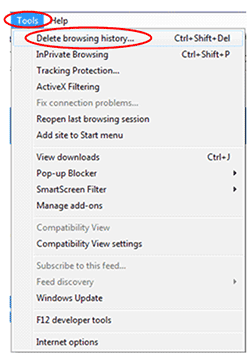
Step 1: Click on “Tools” on menu bar and select “Delete browsing history”
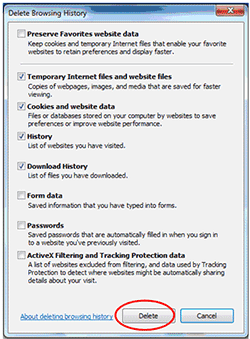
Step 2: Please ensure that the following options are ticked and select “Delete”. After completion, close the browser by clicking on the “X” button on the top right hand corner.
Step 3: Relaunch www.UTRADE.com.sg
Google Chrome
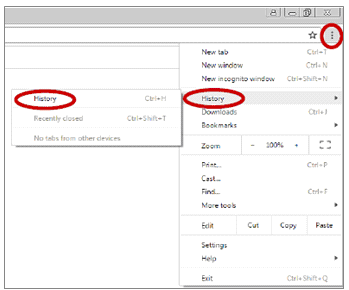
Step 1: Click on the right hand corner icon as shown below and select “History”
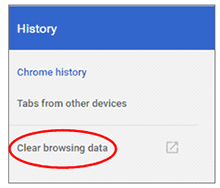
Step 2: Select “Clear browsing data”
Step 3: Select your preference accordingly under “Time range” and select “Clear Data”.
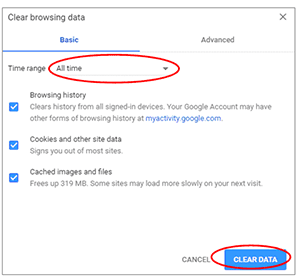
Step 4: Close the page and relaunch www.UTRADE.com.sg
Mozilla Firefox
Step 1: Click on the right hand corner icon as shown below and select “History”
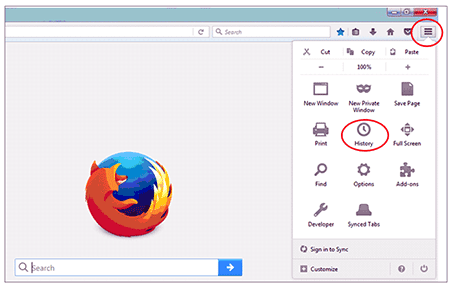
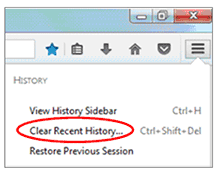
Step 2: Select “Clear recent history”
Step 3: Under “Time range to clear”, select “Everything”. Go through all the options below before you click on “Clear Now””
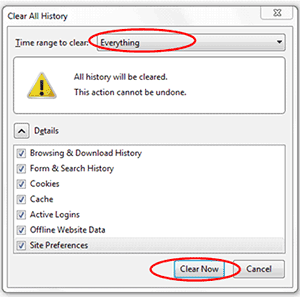
Step 4: Close the page and relaunch www.UTRADE.com.sg
Safari
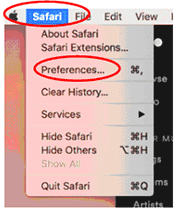
Step 1: Click on “Safari” from menu bar and select on “Preferences”
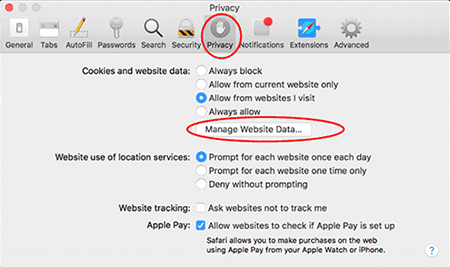
Step 2: Select “Privacy” and click on “Manage Website Data”
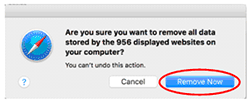
Step 3: Select “Remove All” and then in the small popup, select “Remove Now”
Step 4: Close the page and relaunch www.UTRADE.com.sg