Gain timely investment insights on:
By subscribing, you agree to receive research insights and marketing communications from us, and to the terms of our Privacy Policy . You also consent to the collection, use, processing, disclosure and transfer of your personal data for the purposes described in our Privacy Policy . You may unsubscribe at any time.
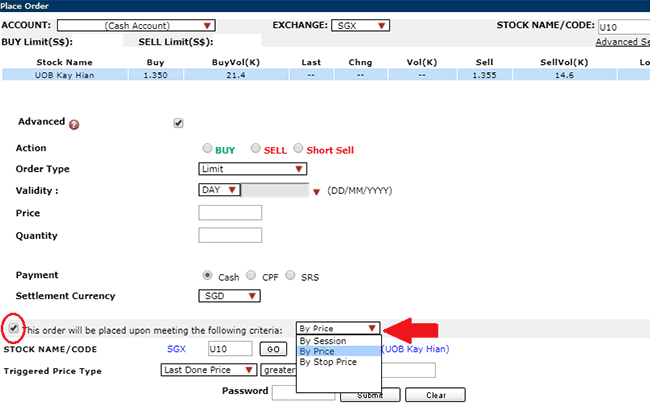
There are 3 conditional orders available, namely by Session, by Price, by Stop Price. It allows you to buy or sell when the triggering criteria are met.
They can only be entered, modified, cancelled and triggered during Open phase. Such orders are not visible to the market before it is converted to the specific order. Orders that are not yet triggered will be displayed as “MO” (ie Under Monitoring Order).
Once the order meets the criteria that were set up, the order will be converted to an active tradable order. Conditional orders can be entered with any order type and validity for the to-be-triggered order. However, validation of the allowable order type and validity for the to-be-triggered order will be done upon activation of the order.
SGX will automatically expire conditional orders that are not activated by end of the trading day.
To place a Conditional Order, go to the Place Order page.
New UTRADE Web Platform, UTRADE SG Mobile App
Step 1: Click on “Conditional”.
Step 2: Search for your desired counter.
Step 3: Select your triggering mode, price and criteria.
Step 4: Fill in the rest of your order details.
Step 5: Once you are ready, click on “Preview & Confirm” to submit your order.
Old UTRADE Web Platform
Kindly follow the steps below :
Step 1: Go to “Place Order”
Step 2: Select a stock
Step 3: To select Conditional Order, click box for order triggering criteria and enter the trigger criteria accordingly.